
Secure virtual data rooms for UK businesses
Secure Virtual Data Rooms for UK Business
Secure document sharing, complete control. ShareAndGo is the virtual data room for finance, legal, and professional services teams. Upload, share, and track confidential documents with tamper-evident audit trails.
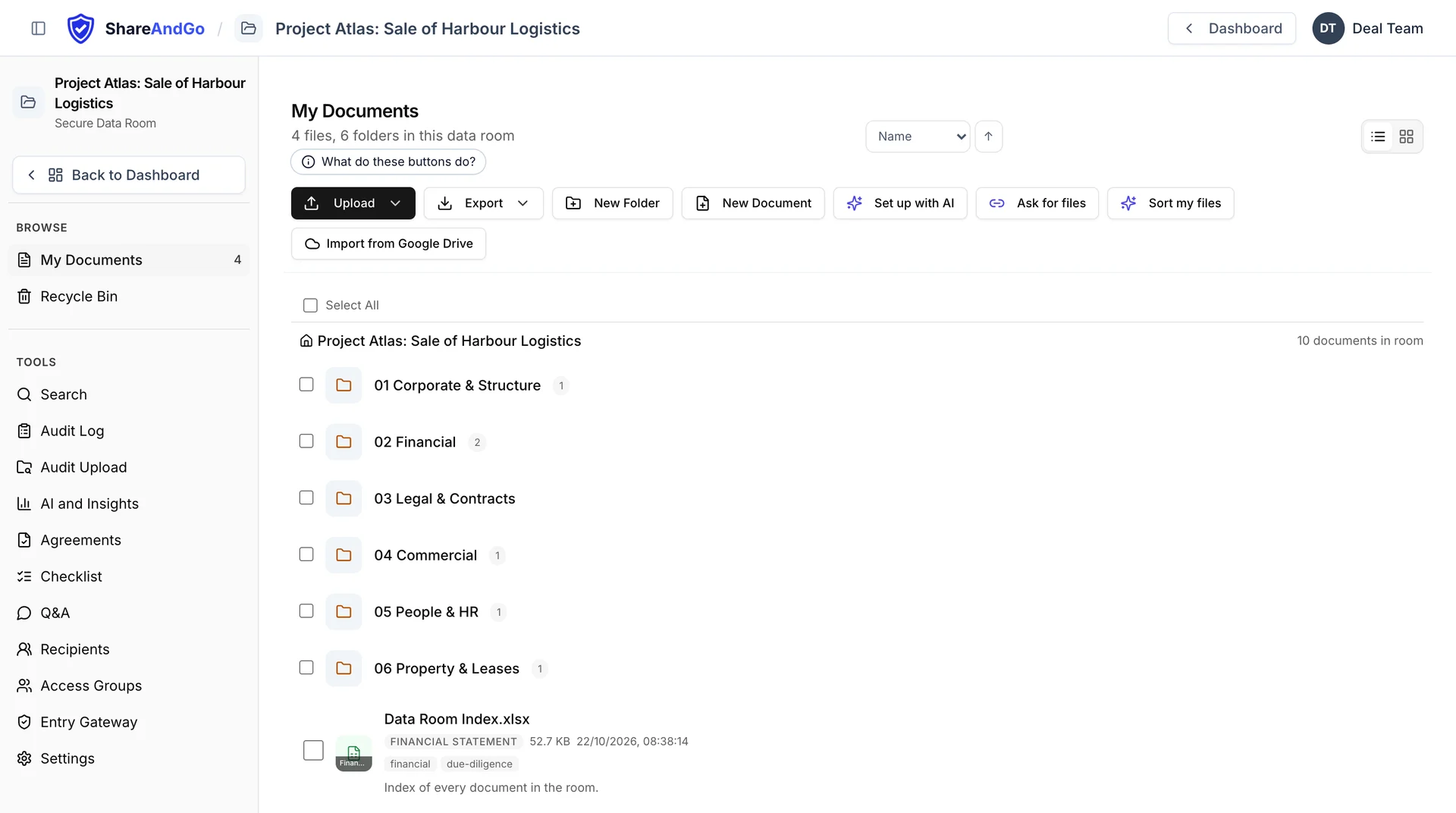
Built for teams who need more than a shared folder
Scattered documents slow deals
Centralise all deal documents in one secure data room. Drag, drop, and organise with full-text search across every file.
Audit gaps create compliance risk
Every document view, download, and search is logged with timestamps and IP addresses. Generate complete audit trails on demand.
Weak access controls leak data
Time-limited access links, opened with a one-time code sent to each person's email. Require NDA acceptance before any document is visible. Revoke access instantly.
From upload to shared in four steps
Create a data room
Set up a secure virtual data room with a name, description, and branding.
Upload documents
Drag and drop PDFs, Word docs, spreadsheets, and images.
Invite participants
Generate access links that check each guest's email with a one-time code. Set expiry dates. Require NDA acceptance.
Track everything
Monitor who viewed what and when, with a full audit trail on every action. On Professional and above, see how long each person spent on each document.
Everything you need for secure document sharing
Deep Search with Context
Search across every document (PDFs, Word, Excel, PowerPoint). See exactly where your term appears with highlighted snippets and page numbers.
Tamper-Evident Audit Trails
Every view, upload, download, and search is logged with SHA-256 hash chaining, timestamps, and IP addresses.
Batch Invites & Contacts
Invite up to 50 people at once from your contact list. Frequent contacts surface first. Save new recipients with one click.
NDA & NCNDA Gating
Require signed NDAs before document access via SignAndGo integration. Standard template or custom upload.
View Duration Tracking
On Professional and above, see exactly how long each person spent on each document, measured as they read.
In-Browser Spreadsheets
Excel files (.xlsx/.xls/.xlsm) open right in the browser with sheet tabs. For no-download recipients they're securely server-rendered, so the raw file never lands on their disk: real view-only for spreadsheets, not the courtesy barrier other VDRs offer.
Drag & Drop with Folders
Upload files by dragging them into the browser. Organise with nested folders and drag-and-drop reordering.
Document Versioning
Re-upload a document and choose: replace as a new version (history preserved), keep both, or skip. Full per-document version history with audit trail of every supersede.
Dynamic Watermarking
Per-recipient watermark on every view with email and timestamp. Any screenshot is traceable back to the viewer: accountability that paper-based marking can't match.
Email Verification Access
No passwords to remember. Recipients verify via a 6-digit code sent to their email. Password links available as fallback.
Insights & Analytics
Per-room analytics dashboard with visitor tracking, document engagement, team activity, and email delivery status.
Q&A Workflows
Auditors ask questions about documents. You reply. Every exchange is tracked, timestamped, and auditable. No more email chains.
Email Notifications
Send access invitations via email. Track delivery status in real time.
Google & Microsoft Login
Sign in with Google or Microsoft. No separate account needed. Two-factor authentication and bank-style session timeout.
Developer API
Programmatic access with scoped API keys. Full documentation with Python, JavaScript, and cURL examples.
Audit Upload
Check every file made it into your room, file by file.
Security built in, not bolted on
- Email-verified access links6-digit OTP code via email, no passwords to manage
- Tamper-evident audit trailSHA-256 hash-chained log of every action with user identity and IP
- NDA / NCNDA gatingRequire signed legal agreements before document access
- Role-based access controlView only, Viewer, Contributor, Editor and admin, with each workspace kept separate
- Bank-style session securityConfigurable idle timeout with countdown, document watermarking, 2FA
Frequently asked questions
What is a virtual data room?
Do users need to create an account?
How does the NDA gating work?
Can I track who viewed my documents?
What file types are supported?
Can I stop recipients forwarding a downloaded file or putting it into an AI tool?
See also
Explore ShareAndGo
What a VDR is & how ours works
Due diligence, audits & M&A
Honest 2026 comparison
What is logged about a visitor
Getting your documents back out
Free interactive template
What the free plan includes
Send confidential files with control
Audit trails, NDA gating, watermarking
Flat monthly plans
Give auditors controlled, audited access
Access groups, folder access, watermarking
Other comparisons
The enterprise VDR alternative
Data room controls and flat pricing
A data room vs cloud storage
Lower cost, flat pricing
Flat pricing, not a custom quote
Flat pricing, not quote-only
Flat pricing and NDA gating
Flat pricing vs per-user seats
NDA gating, watermarks and Q&A
Data-room controls with no IT set-up
Per-recipient watermarks and NDA gating
Flat, predictable pricing
Flat pricing
Data-room controls, not file sync
Flat pricing
M&A rooms, flat pricing
Use cases
By industry
Latest from the blog
Insights on secure document sharing, data rooms, and compliance.